Disclosure: This review may contain affiliate links. As an Amazon Associate, I earn from qualifying purchases—at no extra cost to you.

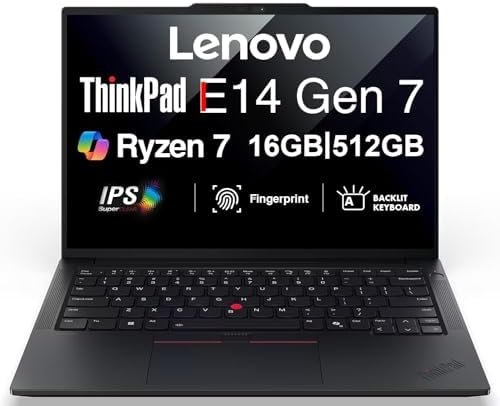
Business laptops need to balance portability, performance, and durability without sacrificing the essentials. The Lenovo ThinkPad E14 Gen 7, as configured by ME2 MichaelElectronics2, aims to deliver that balance with a modern AMD processor, a crisp display, and the professional tools expected from the ThinkPad line. This analysis breaks down the confirmed specifications, explores what the hardware means for everyday workflows, and provides practical guidance for buyers considering this 14-inch business machine in 2026.
📊 Quick Specifications Table
✨ Key Features
The confirmed feature set of this ThinkPad E14 Gen 7 configuration centers on several elements that matter for professional use. The 14-inch IPS display offers a 1920 x 1200 resolution, which provides a slightly taller workspace than standard 1080p panels, useful for documents and spreadsheets. The antiglare finish and 300 nits brightness are practical choices for office lighting and occasional travel.
Performance is driven by the AMD Ryzen 7 250 processor, a Zen 4-based chip with a base speed of 3.3 GHz and a maximum boost of 5.1 GHz. Paired with 16 GB of DDR5 RAM, this configuration is positioned for multitasking across business applications, video conferencing, and data-heavy workflows. The integrated AMD Radeon 780M graphics handle visual output without requiring a discrete GPU, keeping power consumption and heat generation in check.
Storage comes in the form of a 512 GB PCIe NVMe SSD, offering fast boot times and quick application loading. The system runs Windows 11 Pro, which includes enterprise-oriented security and management features, plus AI-powered Copilot integration for task assistance.
Connectivity is a strong point, with Thunderbolt 4 support, USB 3.2 Type-C, USB-A, and HDMI ports. The inclusion of an RJ-45 Ethernet port is notable for business users who need stable wired network connections. Wireless connectivity covers Wi-Fi 802.11ax and Bluetooth 5.3.
Security and convenience features include a fingerprint reader for quick login and a 5M RGB webcam for clearer video calls. The backlit keyboard supports work in dim environments.
🎨 Design and Build Considerations
The ThinkPad E14 Gen 7 follows the familiar clamshell design language of the series. The confirmed dimensions of 12.38 inches in length, 8.9 inches in width, and 1 inch in thickness place it in the portable category for a 14-inch business laptop. The listing describes it as lightweight and compact, which aligns with the expectations for a machine meant to move between office, home, and client sites.
Durability is addressed through MIL-STD-810H testing, a military-grade standard that indicates the chassis has been evaluated against extreme environmental conditions. This does not guarantee survival in every scenario, but it suggests a level of ruggedness beyond typical consumer laptops. The build also incorporates recycled plastic in its components, reflecting a modest sustainability effort.

The keyboard is described as backlit and standard, consistent with the ThinkPad typing experience that many professionals favor. The touchpad serves as the primary pointing device, and the fingerprint reader is integrated for quick authentication.
⚡ Performance Expectations
Performance analysis must remain grounded in the confirmed specifications. The AMD Ryzen 7 250 processor, built on the Zen 4 architecture, represents a modern mid-to-high-tier mobile chip. With a boost clock of up to 5.1 GHz, it is positioned to handle demanding productivity tasks, including complex spreadsheets, data analysis, coding, and virtual meetings with multiple applications running simultaneously.
The 16 GB of DDR5 RAM is a meaningful configuration for 2026. It supports smooth multitasking across browser tabs, office suites, communication tools, and background processes. The maximum supported RAM of 64 GB indicates headroom for future upgrades, though buyers should verify the upgrade process and compatibility before purchasing additional memory.
The 512 GB PCIe NVMe SSD provides adequate storage for most business users, with fast read and write speeds typical of NVMe drives. The integrated AMD Radeon 780M graphics handle the 1920 x 1200 display output and can support light creative tasks, but this is not a machine designed for heavy gaming or 3D rendering.
Windows 11 Pro adds AI-powered Copilot, which can assist with task management, document drafting, and system-level queries. The practical benefit depends on how deeply the user integrates Copilot into their workflow, but the inclusion reflects the current direction of business computing.
⚖️ Pros and Cons
Pros
- Modern AMD Ryzen 7 250 processor with Zen 4 architecture and high boost clock
- 16 GB DDR5 RAM provides solid multitasking capability
- Thunderbolt 4 support enables fast data transfer and external display connectivity
- IPS display with 1920 x 1200 resolution and antiglare coating
- MIL-STD-810H testing suggests enhanced durability
- Windows 11 Pro includes enterprise-grade security and Copilot AI
- Fingerprint reader and 5M RGB webcam support secure, clear video conferencing
- RJ-45 Ethernet port for stable wired networking
- Backlit keyboard for low-light environments
Cons
- Integrated graphics limit gaming and heavy creative workloads
- 512 GB storage may fill quickly for users with large media libraries
- The manufacturer box was opened for upgrade installation, which may concern some buyers
- Battery life is described as improved but exact runtime is not confirmed
- 1-inch thickness is not the thinnest in the category
🆚 Comparison with Similar Products
Within the 14-inch business laptop category, this ThinkPad E14 Gen 7 configuration competes with machines that offer similar processor tiers, RAM amounts, and display resolutions. The key differentiators here are the Thunderbolt 4 port, the MIL-STD-810H durability testing, and the inclusion of Windows 11 Pro with Copilot.
Compared to entry-level business laptops with older AMD Ryzen 5 processors and 8 GB of RAM, this configuration offers a meaningful step up in multitasking capability and future-proofing. The 16 GB DDR5 RAM and the Ryzen 7 250 processor position it for users who run multiple demanding applications simultaneously.
Compared to premium ultrabooks with Intel Core i7 or i9 processors and discrete graphics, this machine trades some raw performance for a more balanced price point and integrated efficiency. Buyers who need dedicated GPU power for video editing or 3D modeling would need to look at higher-tier configurations.

The ThinkPad brand carries a reputation for keyboard quality and business-focused reliability, which is reinforced by the MIL-STD-810H testing. Buyers choosing between this and a consumer-oriented laptop should weigh the durability certification, the RJ-45 port, and the Windows 11 Pro operating system as business-specific advantages.
🛒 Buying Guide
Choosing the right business laptop requires matching the hardware to the actual workload. For professionals who spend their days in office suites, web browsers, email clients, and video conferencing tools, this configuration provides ample performance. The 16 GB RAM ensures that switching between applications remains fluid, and the Ryzen 7 250 processor handles processor-intensive tasks without significant slowdown.
Check latest price and availability on Amazon
The 14-inch display with 1920 x 1200 resolution is a practical size for portability while still offering enough screen real estate for productive work. The antiglare finish reduces reflections in brightly lit offices, and the 300 nits brightness is adequate for indoor use.
Connectivity options deserve careful consideration. Thunderbolt 4 opens up possibilities for high-speed external storage, docking stations, and multiple external displays, though the exact number of supported monitors is not confirmed in the listing. The USB-A ports and HDMI output ensure compatibility with existing peripherals and projectors.
Security is addressed through the fingerprint reader and Windows 11 Pro’s built-in protections. For professionals handling sensitive data, these features provide a baseline level of access control without requiring additional hardware.
Buyers should also consider the upgrade path. The listing confirms that RAM can be expanded to 64 GB, which extends the useful life of the machine. The 512 GB SSD can be replaced or supplemented, though the exact upgrade procedure is not detailed in the listing.
✅ Key Things to Verify Before Buying
Before making a purchase decision, buyers should verify several details on the Amazon listing to ensure this configuration meets their specific needs.
- Battery life: The listing mentions improved battery life but does not provide specific runtime figures. Check the listing for any additional battery details or read the manufacturer’s official specifications.
- Port capabilities: While Thunderbolt 4, USB 3.2 Type-C, USB-A, and HDMI are confirmed, the exact number of USB-A ports and the specific HDMI version are not stated. Verify the port layout if you rely on multiple wired peripherals.
- External display support: The listing does not specify how many external monitors can be connected simultaneously. If multi-monitor setups are essential, confirm this capability before purchase.
- Warranty details: The upgraded RAM and SSD carry a 3-year warranty from MichaelElectronics2, while other hardware retains the original 1-year manufacturer warranty. Understand what is covered and for how long.
- Upgrade installation: The manufacturer box was opened for certified upgrade installation. Confirm that this does not affect your comfort level with the purchase.
- Included accessories: The listing does not detail the included power adapter wattage, cable types, or any bundled accessories. Verify what ships with the laptop.
- Weight: The listing describes the laptop as lightweight but does not provide an exact weight figure. If portability is critical, check for the weight specification.
❓ Frequently Asked Questions
Is the AMD Ryzen 7 250 processor suitable for business productivity?
Yes. The Ryzen 7 250 is a Zen 4-based processor with a boost clock of up to 5.1 GHz. It is well-suited for office applications, web browsing, video conferencing, and multitasking. The 16 GB DDR5 RAM complements the processor for smooth performance across typical business workloads.
Can the RAM be upgraded beyond 16 GB?
The confirmed specifications list a maximum RAM capacity of 64 GB. This suggests the system can support additional memory, but buyers should verify the upgrade process, the number of available SODIMM slots, and compatibility before purchasing additional RAM.
Does this laptop support external monitors?
The listing confirms Thunderbolt 4 and HDMI video outputs, which can connect to external displays. However, the exact number of simultaneous monitors supported is not specified. Buyers with multi-monitor setups should verify this capability on the Amazon listing before purchase.
What operating system is pre-installed?
This configuration ships with Windows 11 Pro 64-bit. This version includes enterprise-grade security features, management tools, and AI-powered Copilot integration for enhanced productivity.
Is the laptop durable enough for travel?
The chassis is MIL-STD-810H tested, indicating it has been evaluated against extreme environmental conditions. The listing also mentions a lightweight and compact design. These factors suggest reasonable durability for business travel, though no laptop is indestructible.
What is the warranty coverage?
The upgraded RAM and SSD include a 3-year warranty from MichaelElectronics2. All other hardware components are covered by the original 1-year manufacturer warranty. Buyers should review the full warranty terms on the
Amazon listing before purchase.
Does the laptop include a fingerprint reader?
Yes, a fingerprint reader is confirmed in the specifications. This allows for quick and secure login without typing a password, which is a practical convenience for business users who handle sensitive information.
What type of display does this laptop have?
This configuration features a 14-inch IPS display with a 1920 x 1200 resolution, a 60Hz refresh rate, and 300 nits of brightness. The antiglare coating reduces reflections, making it suitable for office environments with overhead lighting.
Is the backlit keyboard standard?
Yes, the keyboard is described as a backlit standard keyboard. This means it includes illumination for typing in low-light conditions, which is useful for evening work or travel.
Can I use this laptop for video conferencing?
Yes. The 5M RGB webcam provides a higher-resolution image for video calls, and the built-in microphone and speakers support communication. The laptop also supports Wi-Fi 802.11ax and Bluetooth 5.3 for wireless headset connectivity.
🏁 Final Verdict
The Lenovo ThinkPad E14 Gen 7, as configured by ME2 MichaelElectronics2, represents a well-rounded business laptop for 2026. The combination of the AMD Ryzen 7 250 processor, 16 GB of DDR5 RAM, and a 512 GB NVMe SSD delivers a balanced performance profile that handles everyday office tasks, multitasking, and video conferencing with ease. The 14-inch IPS display with 1920 x 1200 resolution offers a practical workspace, and the antiglare finish supports comfortable viewing in typical office lighting.
The inclusion of Thunderbolt 4, USB-A, HDMI, and RJ-45 Ethernet ports provides versatile connectivity options that cover both modern and legacy peripherals. The MIL-STD-810H testing suggests a level of durability that aligns with the ThinkPad brand’s business-focused reputation. Windows 11 Pro adds enterprise-grade security and the AI-powered Copilot assistant, which can enhance productivity for professionals who integrate it into their workflows.
Buyers should weigh the fact that the manufacturer box was opened for certified upgrade installation, though the upgraded components carry a 3-year warranty from MichaelElectronics2. The integrated graphics limit gaming and heavy creative work, and the 512 GB storage may require expansion for users with large files. Battery life is described as improved, but exact runtime figures are not confirmed, so buyers with long travel days should verify this detail.
Overall, this configuration is best suited for business professionals, educators, developers, and small business users who need a reliable, portable, and secure laptop for daily productivity. The upgrade path to 64 GB of RAM extends its useful life, and the connectivity options ensure compatibility with a wide range of peripherals. For those seeking a balanced 14-inch business machine with modern performance and durable construction, this ThinkPad E14 Gen 7 configuration is a solid choice worth considering.
Check latest price and availability on Amazon