Disclosure: This review may contain affiliate links. As an Amazon Associate, I earn from qualifying purchases—at no extra cost to you.

The Lenovo IdeaPad Slim 3 series has long been a reliable choice for users who need a balanced combination of portability, performance, and everyday usability. The 2025 model year iteration, featuring a 15.3-inch WUXGA touchscreen and the AMD Ryzen 7 8840HS processor, aims to elevate the standard ultraportable experience. This analysis breaks down the confirmed specifications, design considerations, and performance expectations for this specific configuration (Model 83KA000QUS) to help you determine if it aligns with your computing needs in 2026.
📊 Quick Specifications Table
✨ Key Features
Based on the official listing, this laptop is built around several core features that define its daily usability. The most prominent is the 15.3-inch WUXGA touchscreen, which offers a resolution of 1920 x 1200 pixels. This resolution, combined with the 16:10 aspect ratio, provides a taller viewing area compared to the more common 16:9 panels, which can be beneficial for document editing, web browsing, and coding. The capacitive touchscreen adds a layer of convenience for those who prefer direct manipulation of the interface.
Under the hood, the AMD Ryzen 7 8840HS processor is a significant component. With a base speed of 3.3 GHz and a maximum boost clock of 5.1 GHz, this CPU is positioned to handle demanding multitasking scenarios. Paired with 16GB of DDR5 RAM running at 5600 MHz, the system is configured to maintain responsiveness when juggling multiple applications, browser tabs, and productivity suites simultaneously.
Storage is handled by a 512GB PCIe SSD, which is the current standard for modern laptops, offering faster boot times and application loading compared to traditional hard drives. For graphics, the system relies on the integrated AMD Radeon 780M, which is the graphics solution embedded within the Ryzen 7 processor. This is suitable for everyday visual tasks and light media consumption, though it is not designed for high-end gaming or intensive 3D rendering.
🎨 Design and Build Considerations
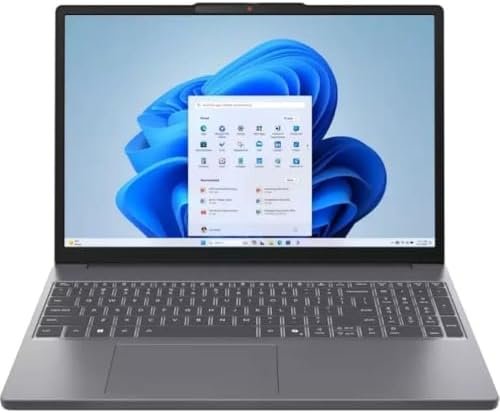
The aesthetic of this device is defined by its Luna Gray finish, which gives it a professional and understated look. The listing describes the laptop as “Slim and lightweight,” aligning with the “Slim” moniker in its name. The physical dimensions are confirmed at 14.15 inches in length, 9.25 inches in width, and 0.7 inches in thickness, indicating a relatively portable form factor for a 15.3-inch device.
User interaction is facilitated by a backlit keyboard with a standard QWERTY layout. The backlighting is a practical feature for working in dimly lit environments, such as on an evening commute or in a darkened room. The inclusion of an integrated webcam addresses the need for video conferencing and remote meetings, a standard requirement for modern work and study.
Connectivity is covered by a modern selection of ports, including USB-C, USB-A, and HDMI. This mix allows for connection to various peripherals, external displays, and storage devices without requiring a dongle in most cases. The presence of a headphone/microphone combo jack is also confirmed, which is essential for private audio listening or using an external headset.

⚡ Performance Expectations
It is important to frame performance expectations based on the confirmed hardware specifications rather than subjective testing. The combination of the AMD Ryzen 7 8840HS and 16GB of DDR5 RAM suggests a high level of capability for productivity-oriented tasks. Users can expect smooth performance in office applications, spreadsheet management, and heavy web browsing with numerous active tabs. The processor’s high boost clock speed of up to 5.1 GHz indicates strong potential for bursty workloads, such as video encoding or complex data processing, though sustained performance will depend on the system’s thermal management, which is not detailed in the listing.
The 512GB PCIe SSD is a critical component for overall system responsiveness. It ensures that the operating system boots quickly, applications launch without long waits, and file transfers are efficient. This storage type is a significant upgrade over older mechanical drives and contributes to the overall “snappy” feel of the machine.
For graphics, the integrated AMD Radeon 780M is a capable iGPU for everyday use. It can handle 4K video playback, photo editing in light applications, and casual games at lower settings. However, it is not a discrete graphics card, so users with heavy 3D modeling, high-refresh-rate gaming, or professional video editing requirements should consider a laptop with a dedicated GPU. The performance here is about efficiency and adequate daily capability, not raw graphical power.
⚖️ Pros and Cons
Pros
- High-Resolution Touchscreen: The 1920×1200 WUXGA display with a 16:10 aspect ratio offers a sharp image and extra vertical screen space for productivity.
- Powerful Processor: The AMD Ryzen 7 8840HS is a high-performance CPU capable of handling demanding multitasking and productivity workloads.
- Ample Memory: 16GB of DDR5 RAM at 5600MHz is a generous amount for smooth multitasking and future software requirements.
- Fast Storage: The 512GB PCIe SSD provides quick boot times and responsive application loading.
- Modern Connectivity: Wi-Fi 6 and USB-C offer modern wireless and wired connection standards for peripherals and networks.
- Backlit Keyboard: Enhances usability in low-light conditions.
Cons
- Integrated Graphics Only: The reliance on the integrated Radeon 780M means it is not suitable for serious gaming or intensive 3D rendering tasks.
- Limited Storage Capacity: 512GB may be restrictive for users with large local media libraries or extensive game installations.
- Warranty Length: The confirmed warranty description is 90 days, which is relatively short compared to industry standards.
🆚 Comparison with Similar Products
When positioning this laptop within the broader market, it sits in the “mainstream ultraportable” category. Compared to entry-level laptops with older or lower-tier processors (e.g., Ryzen 3 or Intel Core i3), this model offers significantly more processing power and memory, making it better suited for heavy multitasking and more complex applications.
Check latest price and availability on Amazon
Compared to premium ultrabooks or mobile workstations, this device differentiates itself by using integrated graphics rather than a discrete GPU. This means it will generally be more affordable and offer better battery efficiency for basic tasks, but it will lag behind in graphical performance. The 15.3-inch touchscreen is a notable feature that is not always standard on comparable non-touch laptops, adding a layer of interactive convenience that some users may find essential.

For a user coming from an older laptop with a 1366×768 display and a mechanical hard drive, this model represents a massive leap forward in screen clarity, system responsiveness, and overall speed. For a user requiring CAD software or AAA gaming, this would not be the appropriate choice, and they would need to look at systems with dedicated graphics cards.
🛒 Buying Guide
This laptop is best suited for students, professionals, and home users who need a reliable primary computer for daily tasks. The confirmed specifications point to a device that excels at:
- Productivity: Word processing, spreadsheets, email, and presentation creation will run flawlessly.
- Content Consumption: Streaming high-definition video, browsing social media, and video calls are well within its capabilities.
- Remote Work/Study: The integrated webcam, backlit keyboard, and Wi-Fi 6 connectivity make it a solid tool for Zoom meetings and online classes.
- Light Creative Work: Basic photo editing and light video editing are possible, but rendering times will be longer than on systems with discrete GPUs.
If your primary needs involve heavy gaming, 3D modeling, or professional video editing, you should look for a laptop with a dedicated graphics card. However, if you need a fast, responsive, and portable machine for work and study, this configuration offers a strong balance of performance and features.
✅ Key Things to Verify Before Buying
Before making a purchase decision, it is prudent to verify a few details on the Amazon listing to ensure this model meets your specific expectations:
- Battery Life: The listing confirms a Lithium-Ion battery but does not specify the exact capacity in Watt-hours (the provided “2 watt-hours” figure appears to be a listing error). Check the listing for specific battery life claims or capacity details.
- Warranty Terms: The warranty is listed as “90 days.” Confirm the exact terms and conditions of this warranty, and consider if an extended warranty is necessary for your peace of mind.
- Port Specifications: While USB-C and HDMI are confirmed, the specific versions (e.g., USB 3.2 vs. USB 4, HDMI 1.4 vs. 2.0) are not detailed. Verify these if you have specific high-speed peripheral or external display requirements.
- Included Accessories: The listing mentions “Laptop, Charger & Guide.” Verify the charger’s wattage and whether any additional accessories are included in the box.
- Bluetooth Version: While Bluetooth is confirmed, the specific version number is not. If you have specific Bluetooth peripherals, check the listing for this detail.
❓ Frequently Asked Questions (FAQ)
Is this laptop good for programming?
Yes, the combination of the Ryzen 7 processor, 16GB of RAM, and a high-resolution 16:10 display makes it an excellent choice for coding. The extra vertical screen space is great for viewing more lines of code, and the powerful CPU will handle compilation and running virtual machines efficiently.
Can this laptop handle light gaming?
It can handle casual and older games at lower settings thanks to the integrated AMD Radeon 780M graphics. However, it is not designed for modern AAA titles or high-refresh-rate gaming. For serious gaming, a laptop with a dedicated graphics card is required.
Is the RAM upgradeable?
The listing specifies that the maximum RAM memory size is 16GB. This suggests that the memory is soldered to the motherboard and cannot be upgraded after purchase. You should ensure 16GB is sufficient for your needs.
Does the touchscreen support stylus input?
The listing confirms a capacitive touchscreen, which is designed for finger input. It does not mention support for an active stylus or pen, so you should not assume it is compatible with one.
What is the aspect ratio of the display?
The display has a 16:10 aspect ratio with a native resolution of 1920 x 1200 pixels. This is taller than the traditional 16:9 widescreen format, providing more vertical workspace for documents and web pages.
🏁 Final Verdict
The Lenovo IdeaPad Slim 3 with the AMD Ryzen 7 8840HS is a compelling option for users seeking a well-rounded, high-performance laptop for everyday and professional use. Its strengths lie in the powerful processor, generous 16GB of DDR5 RAM, fast SSD storage, and the highly functional 15.3-inch WUXGA touchscreen display. The 16:10 aspect ratio is a significant boon for productivity, and the inclusion of Wi-Fi 6 and a backlit keyboard rounds out a solid feature set.
While it is not designed for gamers or users requiring heavy graphical compute power, it excels as a primary workhorse for students, business professionals, and home users. The main caveats are the non-upgradeable RAM and the
short warranty period, which is something to consider. For the right user, this laptop delivers a strong combination of performance, portability, and interactive features that make it a dependable choice for daily computing in 2026.
If your workflow involves heavy multitasking, document creation, and media consumption, this configuration offers excellent value. The touchscreen adds a layer of convenience that many competitors in this price segment lack, and the Ryzen 7 processor ensures that the system will remain responsive for years to come. While the integrated graphics limit its appeal to gamers and 3D artists, the vast majority of users will find that this laptop handles their daily tasks with ease and efficiency.
Before purchasing, take a moment to confirm the specific port versions, battery capacity, and warranty terms on the Amazon listing to ensure they align with your expectations. With those details verified, the Lenovo IdeaPad Slim 3 stands as a smart investment for anyone seeking a capable, modern, and touch-enabled laptop that balances performance with everyday practicality.
Check latest price and availability on Amazon